What is MCP?
MCP (Model Context Protocol) is an open-source standard for connecting AI applications to external systems.
"Think of MCP like a USB-C port for AI applications. Just as USB-C provides a standardized way to connect electronic devices, MCP provides a standardized way to connect AI applications to external systems."
Without MCP, every AI app needs a custom integration for every data source — N apps × M sources = N×M integrations. With MCP, you build one server and it works everywhere: Claude, ChatGPT, VS Code, Cursor, and any other MCP-capable app.
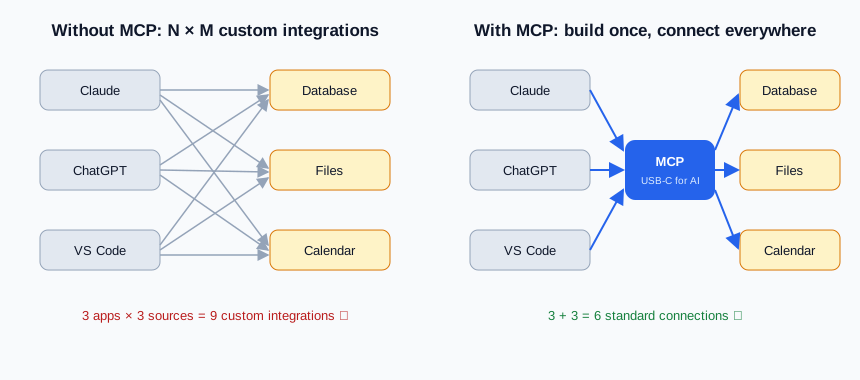
Real-world examples from the docs:
- An agent reading your Google Calendar and Notion
- Claude Code generating a web app from a Figma design
- An enterprise chatbot querying multiple internal databases
- AI creating 3D designs in Blender
Architecture: Host, Client, Server
| Participant | What it is | Example |
|---|---|---|
| MCP Host | The AI application the user interacts with; coordinates one or more MCP clients | Claude Desktop, Claude Code, VS Code |
| MCP Client | A protocol component inside the host; maintains a 1:1 connection to one server | (created automatically by the host) |
| MCP Server | A program that provides context to clients | Your task-tracker server, Sentry MCP, filesystem server |
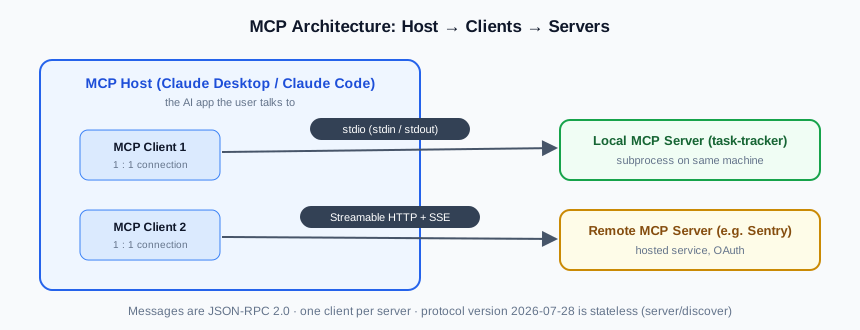
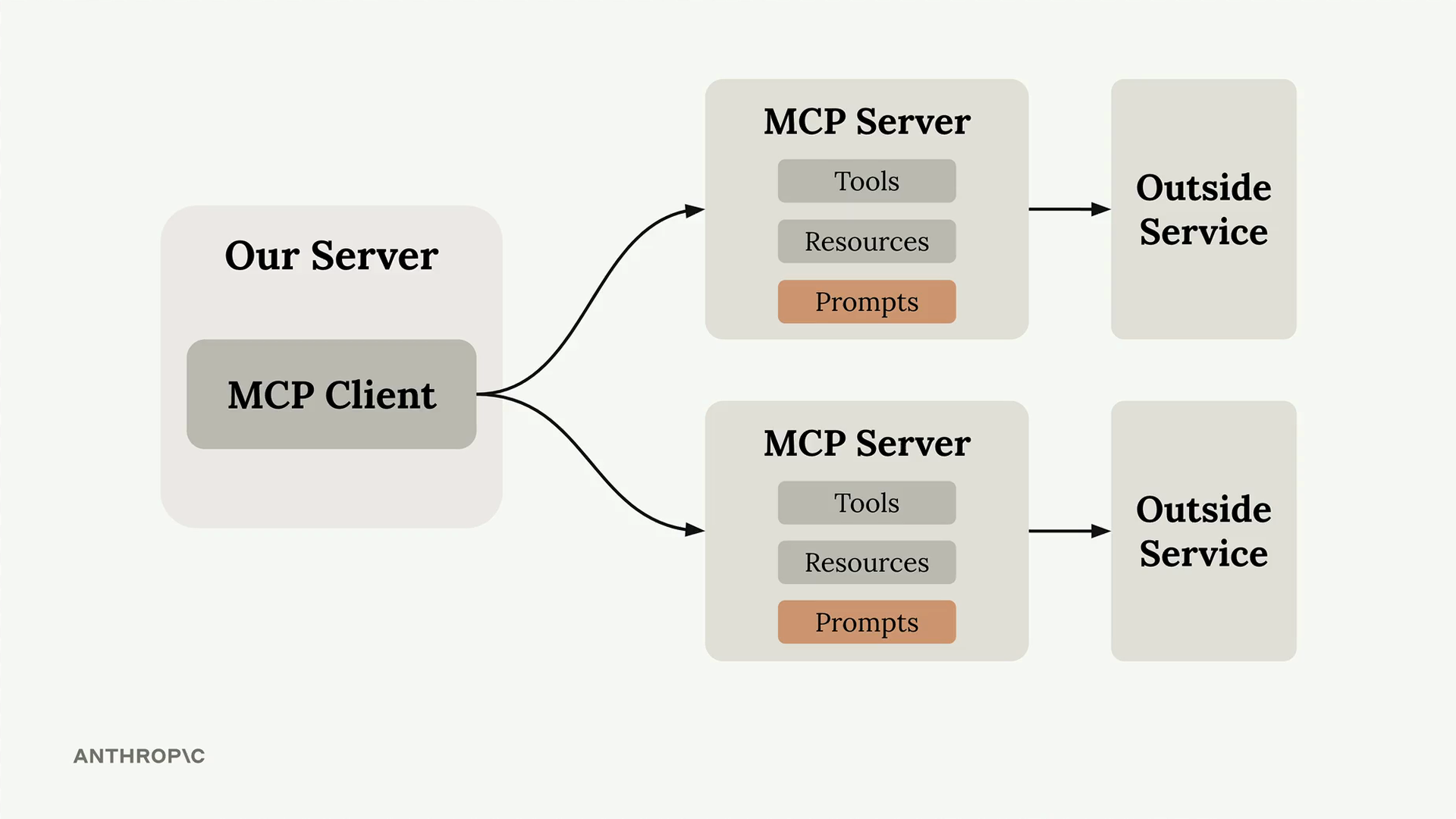
One MCP client talks to exactly one server, but the host can hold many clients — each server exposing its own tools, resources, and prompts in front of an outside service:
Two transports
- stdio — server runs as a local subprocess; messages flow over stdin/stdout. Fastest, no network. Beginners start here (our example uses it).
- Streamable HTTP — server runs remotely; HTTP POST + optional Server-Sent Events. For shared/hosted servers; auth via OAuth / bearer tokens.
Under the hood (good to know — the SDK handles it)
- Messages are JSON-RPC 2.0.
- As of protocol 2026-07-28, MCP is stateless: no initialize handshake. Every request carries protocol version + client info in
_meta; clients can callserver/discoverto learn capabilities. - Older revisions (2025-11-25 and earlier) used an
initializehandshake — SDKs handle backward compatibility.
The three server primitives
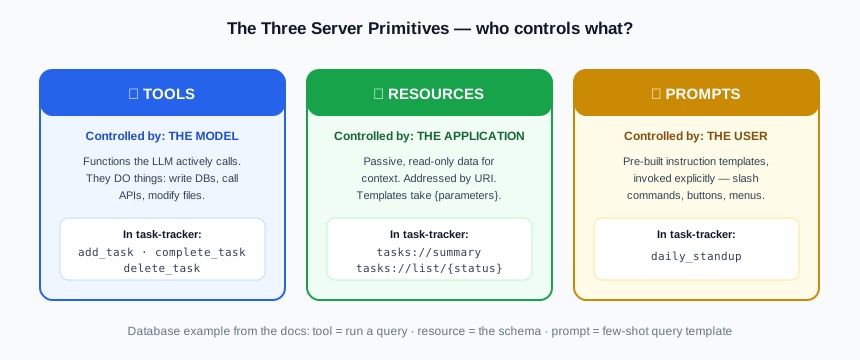
The most important concept. A server exposes three kinds of things, distinguished by who controls them:
| Primitive | What it is | Who decides | Example |
|---|---|---|---|
| Tools | Functions the LLM actively calls — they do things (write DBs, call APIs, modify files) | The model | add_task, search_flights |
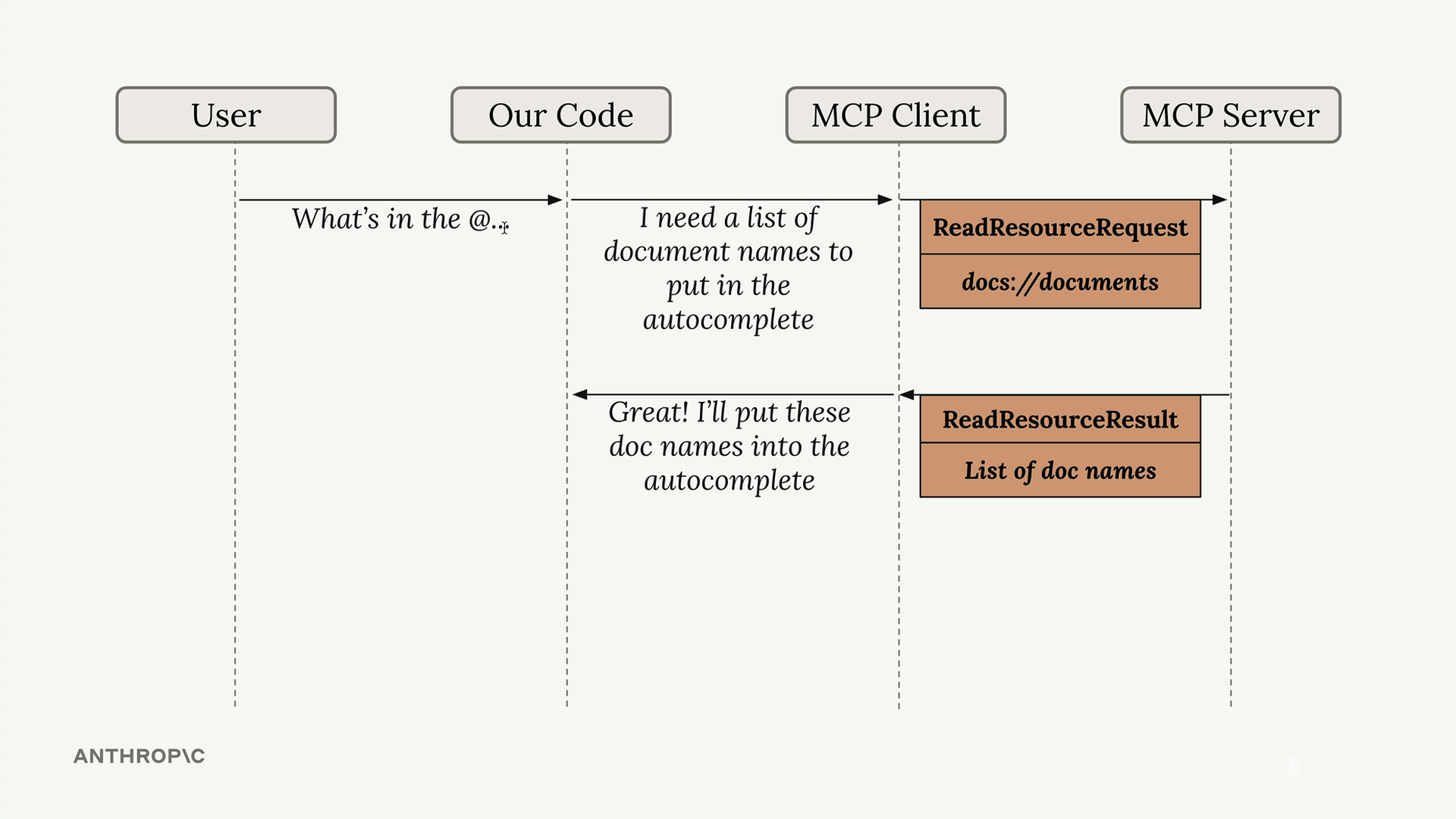
| Resources | Passive, read-only data that provides context | The application | file contents, DB schema, tasks://summary |
| Prompts | Pre-built instruction templates | The user (slash commands, buttons) | /daily_standup, "plan a vacation" |
Tool → query the database (model decides when) · Resource → the schema (app attaches it as context) · Prompt → few-shot query template (user invokes it).
Resources have URIs (file:///doc.md, tasks://summary) and can be templates with parameters (tasks://list/{status}).
"Application-controlled" in practice: here the host reads a resource just to power an @-mention autocomplete — the model never asked for it:
Client-side primitives: the only current one is elicitation (server asks the user for input mid-operation — see §7.3). Sampling, roots, and logging are deprecated as of 2026-07-28 — you'll see them in older tutorials; don't build new code with them.
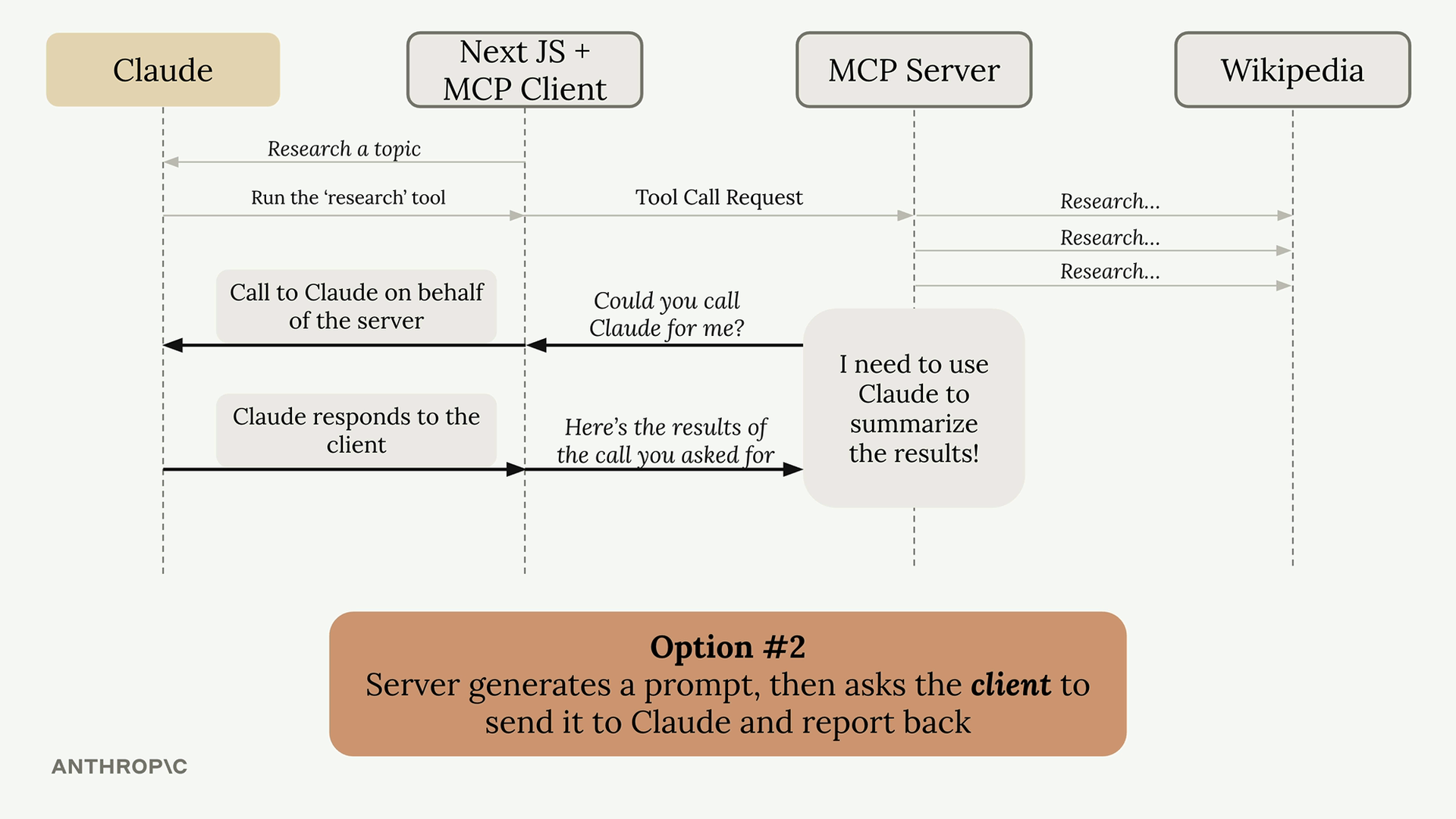
For reference, deprecated sampling — the server asked the client to call Claude on its behalf:
Build your first server
We build a Task Tracker server. Why not the official weather example? The weather quickstart needs internet and only covers tools. Task Tracker works fully offline and demonstrates all three primitives — better for training.
4.1 Setup
Requires Python 3.10+ and uv:
curl -LsSf https://astral.sh/uv/install.sh | sh   # if uv not installed

uv init task-tracker
cd task-tracker
uv add "mcp[cli]"        # official Python SDK (needs 2.0.0+)
4.2 Create the server
Full code in task-tracker/server.py. The skeleton:
from mcp.server import MCPServer

mcp = MCPServer("task-tracker")

# --- TOOL: the model calls this when the user asks to add a task ---
@mcp.tool()
def add_task(title: str, priority: str = "medium") -> str:
    """Add a new task to the tracker.

    Args:
        title: Short description of the task
        priority: One of "low", "medium", "high"
    """
    ...

# --- RESOURCE: read-only context, addressed by URI ---
@mcp.resource("tasks://summary", mime_type="text/plain")
def task_summary() -> str:
    """One-line counts of open and completed tasks."""
    ...

# --- RESOURCE TEMPLATE: parameterized URI ---
@mcp.resource("tasks://list/{status}", mime_type="application/json")
def task_list(status: str) -> str:
    ...

# --- PROMPT: user invokes explicitly, e.g. as a slash command ---
@mcp.prompt()
def daily_standup(name: str = "there") -> str:
    """Generate a standup update from the current task list."""
    ...

if __name__ == "__main__":
mcp.run(transport="stdio")Type hints + docstrings become the tool schema. title: str, the default, and the docstring are converted into the JSON Schema the model sees. Write good docstrings — they're your API documentation for the model.
stdout carries the JSON-RPC stream; printing corrupts it and the server silently breaks. Use logging (goes to stderr) instead.
4.3 Test without any AI app
You don't need Claude to verify a server. Run the included test client:
cd task-tracker
uv run test_client.pyTools: ['add_task', 'complete_task', 'delete_task']
add_task -> Added task #1: Prepare MCP demo (priority: high)
complete_task -> Completed task #1: Prepare MCP demo
tasks://summary -> 1 tasks total — 0 open, 1 done.
...Or use the visual MCP Inspector — a browser UI where trainees click through tools, resources, and prompts:
npx @modelcontextprotocol/inspector uv run server.pyConnect to Claude
Claude Desktop
Edit ~/Library/Application Support/Claude/claude_desktop_config.json (macOS) or %AppData%\Claude\claude_desktop_config.json (Windows) — create it if missing:
{
  "mcpServers": {
    "task-tracker": {
      "command": "uv",
      "args": [
        "--directory",
        "/ABSOLUTE/PATH/TO/MCP-Tutorial/task-tracker",
        "run",
        "server.py"
      ]
    }
  }
}- The path must be absolute (Windows: use
\\or/). - You may need the full path to
uv— find it withwhich uv. - Fully quit Claude Desktop (Cmd+Q) and reopen — closing the window is not enough.
- Verify: click the "+" icon in the chat input → Connectors →
task-trackershould be listed.
Claude Code (CLI)
Register both servers with claude mcp add. The -s user flag stores them in ~/.claude.json so they work from any directory (omit it to register for the current project only). Everything after -- is just the launch command you'd run by hand:
# basic server: tools + resources + prompts
claude mcp add -s user task-tracker -- \
  uv --directory "/ABSOLUTE/PATH/TO/MCP-Tutorial/task-tracker" run server.py

# advanced server: progress notifications + elicitation
claude mcp add -s user task-tracker-advanced -- \
  uv --directory "/ABSOLUTE/PATH/TO/MCP-Tutorial/task-tracker" run advanced_server.py
Verify the connection, then restart the Claude Code session (or run /mcp) to pick up the tools:
claude mcp list
# task-tracker: uv --directory … run server.py           - ✔ Connected
# task-tracker-advanced: uv --directory … run advanced_server.py - ✔ Connected

claude mcp remove -s user task-tracker    # undo later
Try these in the chat
- "Add a high-priority task to finish the quarterly report" → model calls
add_task - "What's on my plate?" → model reads the task list
- "Mark task 1 as done" → model calls
complete_task - Invoke
daily_standupfrom the prompt/command menu → the user-controlled primitive in action
Debugging
tail -n 20 -f ~/Library/Logs/Claude/mcp*.logmcp.log shows connection events; mcp-server-task-tracker.log shows your server's stderr (your logging output lands here).
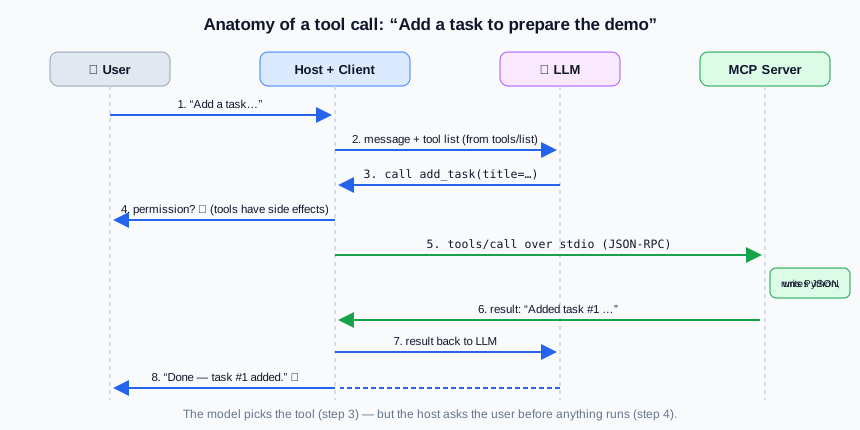
A tool call, step by step
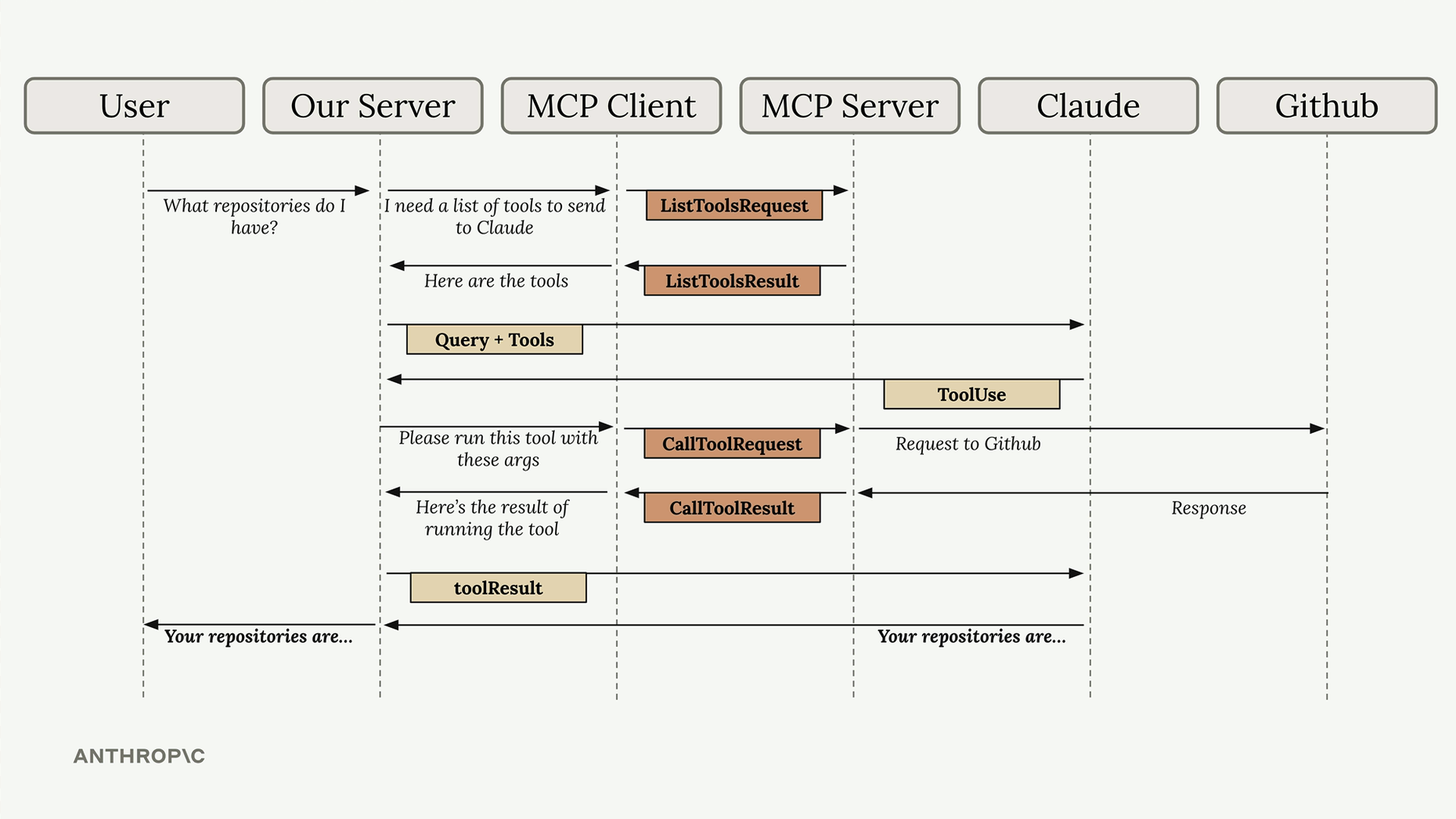
The same flow with actual MCP message names (ListToolsRequest, CallToolRequest) and a real backend (GitHub):
User: "Add a task to prepare the demo"
  1. Host sends the message + tool list to the LLM
  2. LLM decides: call add_task(title="Prepare the demo", priority="medium")
  3. Host asks user for permission (tools can have side effects!)
  4. MCP client sends tools/call over stdio to your server
  5. Your Python function runs, writes tasks.json, returns text
  6. Result goes back to the LLM
7. LLM answers in natural language: "Done — task #1 added."Advanced techniques
Everything below is demonstrated in task-tracker/advanced_server.py + advanced_client.py. Run the demo:
cd task-tracker
uv run advanced_client.pyCalling archive_old_tasks(days=30)...
[server log/info] Starting archive of tasks older than 30 days
[progress] 20% Archived batch 1/5
[progress] 40% Archived batch 2/5
...
[server log/info] Archive complete
Result: Archived 5 batches of tasks older than 30 days.7.1 Progress notifications
For long-running tools (imports, batch jobs), the server streams notifications/progress while the tool is still executing. The tool just declares a ctx: Context parameter — the SDK injects it:
from mcp.server.mcpserver import Context, MCPServer

@mcp.tool()
async def archive_old_tasks(days: int, ctx: Context) -> str:
    """Archive tasks older than N days."""
    for i in range(5):
        await do_one_batch()
        await ctx.report_progress(progress=i + 1, total=5,
                                  message=f"Archived batch {i + 1}/5")
    return "Done."
The client opts in by passing a progress_callback to call_tool (this sends a progressToken with the request — no token, no notifications):
result = await session.call_tool("archive_old_tasks", {"days": 30},
                                 progress_callback=on_progress)
7.2 Log notifications deprecated
ctx.info("...") / ctx.warning("...") send notifications/message to the client — you saw them in the demo output. But the logging capability is deprecated as of 2026-07-28 (SEP-2577) — the SDK emits MCPDeprecationWarning. The example keeps it so you recognize it in existing servers; for new code:
- stdio servers → log to stderr (Python
loggingdoes this by default) - production servers → OpenTelemetry
7.3 Elicitation — ask the user mid-tool
The one current client-side primitive. The server pauses a tool and asks the user a structured question; the schema is a Pydantic model:
from pydantic import BaseModel

class ConfirmDelete(BaseModel):
    confirm: bool

@mcp.tool()
async def delete_all_tasks(ctx: Context) -> str:
    """Delete every task. Asks the user to confirm first."""
    result = await ctx.elicit(
        message="This deletes ALL tasks permanently. Are you sure?",
        schema=ConfirmDelete,
    )
    if result.action == "accept" and result.data and result.data.confirm:
        return "All tasks deleted."
return "Cancelled — nothing was deleted."Two modes: form mode (above — client renders a form from the schema) and URL mode (ctx.elicit_url) for sensitive flows like OAuth, where data never passes through the client or the LLM context. Never use form mode for passwords, API keys, or payment credentials.
Try it in the MCP Inspector — call delete_all_tasks and the confirm dialog pops up.
7.4 Sampling deprecated
Sampling let a server ask the client to run an LLM completion on its behalf (sampling/createMessage) — the server got AI abilities without owning an API key. See the flow diagram in §3. Deprecated as of 2026-07-28; new code should call the LLM provider's API directly (Anthropic SDK). You'll still meet it in older servers — recognize it, don't copy it.
7.5 Roots deprecated
Roots were file:// URIs the client sent to tell the server which directories to work in (e.g. your open workspace folders). Advisory only — never a security boundary. Deprecated as of 2026-07-28; pass directories explicitly via tool parameters, resource URIs, or server config.
sampling → call LLM APIs directly · roots → pass paths as tool params/config · logging → stderr or OpenTelemetry. Deprecated features stay in the spec ≥ 12 months and the SDK still ships the types — old servers keep working while you migrate.
Transports & communication deep dive
8.1 JSON message types
Everything on the wire is JSON-RPC 2.0. Only four shapes exist:
| Type | Has id? | Expects reply? | Example |
|---|---|---|---|
| Request | yes | yes | {"jsonrpc":"2.0","id":1,"method":"tools/call","params":{...}} |
| Result | yes (matches request) | — | {"jsonrpc":"2.0","id":1,"result":{"content":[...]}} |
| Error | yes (matches request) | — | {"jsonrpc":"2.0","id":1,"error":{"code":-32602,...}} |
| Notification | no | no | {"jsonrpc":"2.0","method":"notifications/progress",...} |
Notifications are fire-and-forget — no id, no reply, best-effort delivery. Progress updates and tools/list_changed are notifications.
8.2 The STDIO transport
The client launches your server as a subprocess. Messages are newline-delimited JSON: client writes to the server's stdin, server answers on stdout. That's the whole transport — no ports, no TLS, no network. Fastest option; one server per client.
This is why print() breaks your server: debug text lands in the middle of the JSON-RPC stream and the client fails to parse it. stderr is free — that's where logs go.
Watch it raw — speak JSON-RPC to the server by hand:
echo '{"jsonrpc":"2.0","id":1,"method":"tools/list","params":{"_meta":{"io.modelcontextprotocol/protocolVersion":"2026-07-28","io.modelcontextprotocol/clientInfo":{"name":"raw","version":"1.0"},"io.modelcontextprotocol/clientCapabilities":{}}}}' | uv run server.py8.3 The Streamable HTTP transport
For remote/shared servers. One endpoint (e.g. https://host/mcp) handles everything:
- Client → server: HTTP POST with the JSON-RPC message
- Server → client: a plain JSON response, or a Server-Sent Events (SSE) stream on the same request — that's how progress notifications arrive over HTTP while a tool runs
- Auth: bearer tokens / API keys / custom headers; docs recommend OAuth
Our advanced server can run this way:
uv run advanced_server.py --http # serves http://localhost:8000/mcpThen call it with nothing but curl (verified — this works):
curl -s -X POST http://localhost:8000/mcp \
  -H "Content-Type: application/json" \
  -H "Accept: application/json, text/event-stream" \
  -H "MCP-Protocol-Version: 2026-07-28" \
  -H "mcp-method: tools/list" \
  -d '{"jsonrpc":"2.0","id":1,"method":"tools/list","params":{"_meta":{"io.modelcontextprotocol/protocolVersion":"2026-07-28","io.modelcontextprotocol/clientInfo":{"name":"curl","version":"1.0"},"io.modelcontextprotocol/clientCapabilities":{}}}}'
8.4 State and the Streamable HTTP transport
Protocol revisions ≤ 2025-11-25 were stateful: an initialize handshake created a session, the server issued an Mcp-Session-Id header, and every later request had to carry it. Painful to scale — requests were pinned to the replica holding the session.
2026-07-28 made the protocol stateless. No handshake. Every request is self-contained, carrying in _meta:
io.modelcontextprotocol/protocolVersionio.modelcontextprotocol/clientInfoio.modelcontextprotocol/clientCapabilities
Over HTTP, also send the MCP-Protocol-Version header — omit it and the server falls back to legacy session mode, which is exactly the "Missing session ID" error you'll get.
Capability discovery became a plain idempotent RPC — server/discover — with cache hints (ttlMs, cacheScope), so any replica behind a load balancer can answer any request. Long-lived needs (subscriptions to tools/list_changed, resource updates) use an explicit subscriptions/listen request instead of an implicit session.
Where to go next
| Topic | Link |
|---|---|
| Official quickstart (weather server, 8 languages) | modelcontextprotocol.io/docs/2026-07-28/develop/build-server |
| Build an MCP client | modelcontextprotocol.io/docs/2026-07-28/develop/build-client |
| Architecture deep dive | modelcontextprotocol.io/docs/2026-07-28/learn/architecture |
| Server concepts (tools/resources/prompts) | modelcontextprotocol.io/docs/2026-07-28/learn/server-concepts |
| Client concepts (elicitation) | modelcontextprotocol.io/docs/2026-07-28/learn/client-concepts |
| Reference servers to study | github.com/modelcontextprotocol/servers |
| MCP Inspector | github.com/modelcontextprotocol/inspector |
Exercise ideas for trainees
- Add an
update_tasktool that changes a task's title or priority. - Add a
tasks://priority/{level}resource template. - Add a
weekly_reviewprompt. - Switch the transport to
streamable-httpand connect to it as a remote server. - Rebuild the same server in TypeScript with
@modelcontextprotocol/server+zod.